Android Integration
This guide walks you through packaging your React Native app as an AAR and integrating it into your native Android app.
Prerequisites
- React Native app with
@callstack/react-native-brownfield installed
- Android Studio installed
- An existing Android app (or create a new one)
1. Create an Android Library Module
- Open your React Native project's
android folder in Android Studio
- Go to File → New Module → Android Library
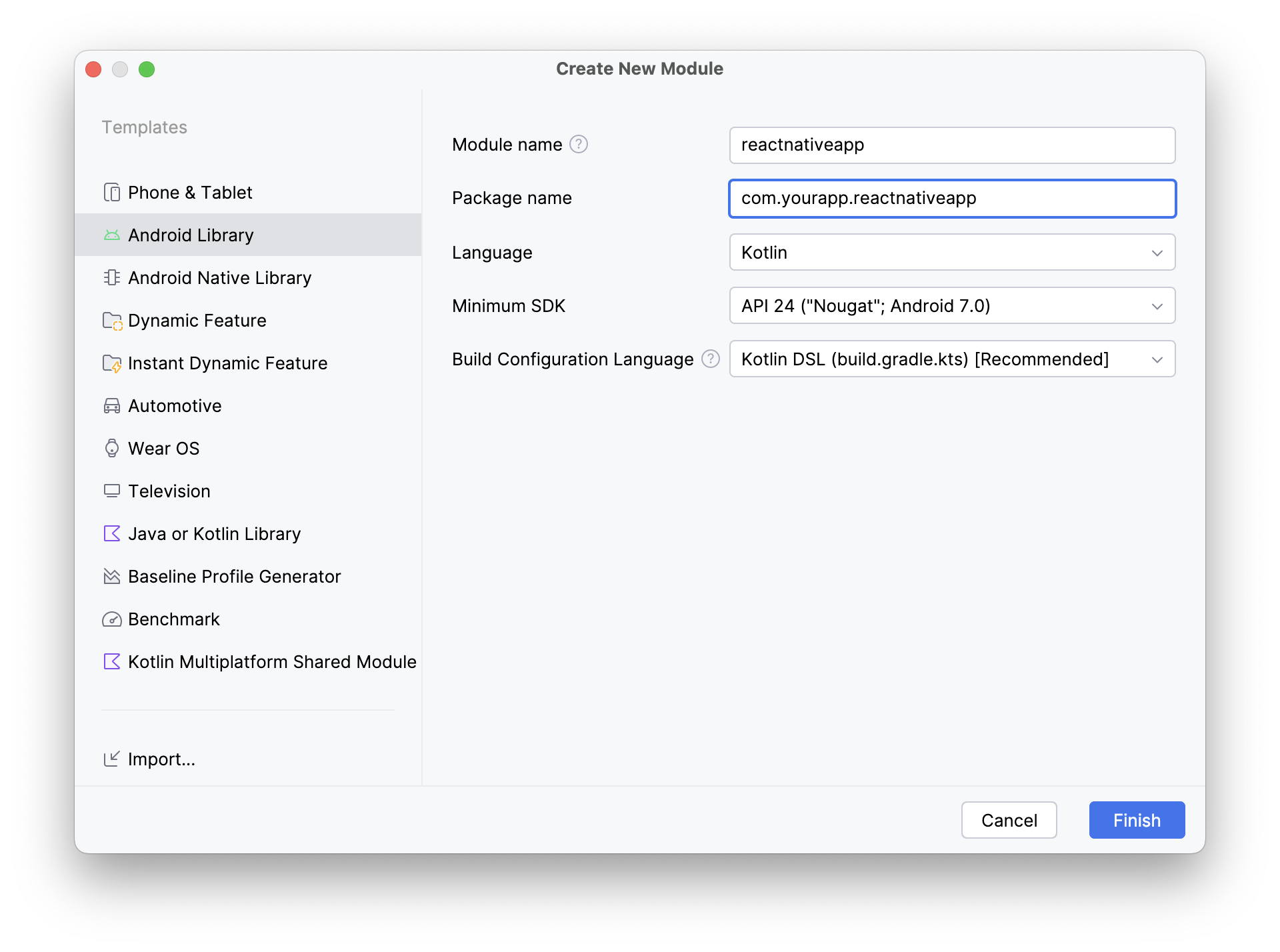
- Name the module (e.g.,
reactnativeapp)
- After sync completes, verify by running
./gradlew assembleRelease
Module Naming
This guide uses module name reactnativeapp in com.yourapp. Adjust to your preferences and update code snippets accordingly.
2. Set Up the AAR Gradle Plugin
Add the brownfield Gradle plugin to android/build.gradle:
buildscript {
    repositories {
        google()
        mavenCentral()
    }
    dependencies {
        classpath("com.callstack.react:brownfield-gradle-plugin:0.6.2")
    }
}
Add the plugin to reactnativeapp/build.gradle.kts:
plugins {
    id("com.android.library")
    id("org.jetbrains.kotlin.android")
    id("com.facebook.react")
    id("com.callstack.react.brownfield")
}
Add autolinking setup:
react {
    autolinkLibrariesWithApp()
}
3. Add React Native Dependencies
Add the code below to reactnativeapp/build.gradle.kts based on your React Native version.
  dependencies {
      // Match your version of React Native below
      api("com.facebook.react:react-android:0.85.0")

      // Use the below for Hermes V1
      api("com.facebook.hermes:hermes-android:250829098.0.10")
      // Alternatively, use the below for legacy Hermes
      // api("com.facebook.hermes:hermes-android:0.16.0")
  }
  dependencies {
      // Match your version of React Native below
      api("com.facebook.react:react-android:0.84.1")

      // Use the below for Hermes V1
      api("com.facebook.hermes:hermes-android:250829098.0.9")
      // Alternatively, use the below for legacy Hermes
      // api("com.facebook.hermes:hermes-android:0.15.1")
  }
  dependencies {
      // Match your version of React Native below
      api("com.facebook.react:react-android:0.84.0")

      // Use the below for Hermes V1
      api("com.facebook.hermes:hermes-android:250829098.0.7")
      // Alternatively, use the below for legacy Hermes
      // api("com.facebook.hermes:hermes-android:0.14.1")
  }
  dependencies {
      // Match your version of React Native below
      api("com.facebook.react:react-android:<RN_VERSION>")
      // e.g., for RN 0.83.4
      // api("com.facebook.react:react-android:0.83.4")

      // Use the below for Hermes V1
      api("com.facebook.hermes:hermes-android:250829098.0.4")
      // Alternatively, use the below for legacy Hermes
      // api("com.facebook.hermes:hermes-android:0.14.1")
  }
  dependencies {
      // Match your version of React Native below
      api("com.facebook.react:react-android:0.83.1")

      // Use the below for Hermes V1
      api("com.facebook.hermes:hermes-android:250829098.0.4")
      // Alternatively, use the below for legacy Hermes
      // api("com.facebook.hermes:hermes-android:0.14.0")
  }
  dependencies {
      // Match your version of React Native below
      api("com.facebook.react:react-android:0.83.0")

      // Use the below for Hermes V1
      api("com.facebook.hermes:hermes-android:250829098.0.4")
      // Alternatively, use the below for legacy Hermes
      // api("com.facebook.hermes:hermes-android:0.14.0")
  }
  dependencies {
      // Match your version of React Native below
      api("com.facebook.react:react-android:<RN_VERSION>")
      api("com.facebook.react:hermes-android:<RN_VERSION>")

      // e.g., for RN 0.82.0
      // api("com.facebook.react:react-android:0.82.0")
      // api("com.facebook.react:hermes-android:0.82.0")
  }
Important
Make sure the React Native version matches the version in your project's package.json.
4. Create React Native Host Manager
Create ReactNativeHostManager.kt in your reactnativeapp module:
package com.yourapp.reactnativeapp

import android.app.Application
import com.callstack.reactnativebrownfield.OnJSBundleLoaded
import com.callstack.reactnativebrownfield.ReactNativeBrownfield
import com.facebook.react.PackageList
import com.facebook.react.ReactNativeApplicationEntryPoint.loadReactNative

object ReactNativeHostManager {
    fun initialize(application: Application, onJSBundleLoaded: OnJSBundleLoaded? = null) {
        loadReactNative(application) // **Only required for RN >= 0.80.0**

        val packageList = PackageList(application).packages
        ReactNativeBrownfield.initialize(application, packageList, onJSBundleLoaded)
    }
}
5. Add Build Config Fields
Add to reactnativeapp/build.gradle.kts:
android {
    defaultConfig {
        minSdk = 24

        buildConfigField("boolean", "IS_EDGE_TO_EDGE_ENABLED", properties["edgeToEdgeEnabled"].toString())
        buildConfigField("boolean", "IS_NEW_ARCHITECTURE_ENABLED", properties["newArchEnabled"].toString())
        buildConfigField("boolean", "IS_HERMES_ENABLED", properties["hermesEnabled"].toString())
    }

    publishing {
        multipleVariants {
            allVariants()
        }
    }
}
Add the Maven publish plugin to reactnativeapp/build.gradle.kts:
plugins {
    // ... existing plugins
    `maven-publish`
}
Add publishing configuration:
import groovy.json.JsonOutput
import groovy.json.JsonSlurper

publishing {
    publications {
        create<MavenPublication>("mavenAar") {
            groupId = "com.yourapp"
            artifactId = "reactnativeapp"
            version = "0.0.1-local"
            afterEvaluate {
                from(components.getByName("default"))
            }

            pom {
                withXml {
                    val dependenciesNode = (asNode().get("dependencies") as groovy.util.NodeList).first() as groovy.util.Node
                    dependenciesNode.children()
                        .filterIsInstance<groovy.util.Node>()
                        .filter { (it.get("groupId") as groovy.util.NodeList).text() == rootProject.name }
                        .forEach { dependenciesNode.remove(it) }
                }
            }
        }
    }

    repositories {
        mavenLocal()
    }
}

val moduleBuildDir: Directory = layout.buildDirectory.get()

tasks.register("removeDependenciesFromModuleFile") {
    doLast {
        file("$moduleBuildDir/publications/mavenAar/module.json").run {
            val json = inputStream().use { JsonSlurper().parse(it) as Map<String, Any> }
            (json["variants"] as? List<MutableMap<String, Any>>)?.forEach { variant ->
                (variant["dependencies"] as? MutableList<Map<String, Any>>)?.removeAll { it["group"] == rootProject.name }
            }
            writer().use { it.write(JsonOutput.prettyPrint(JsonOutput.toJson(json))) }
        }
    }
}

tasks.named("generateMetadataFileForMavenAarPublication") {
   finalizedBy("removeDependenciesFromModuleFile")
}
7. Create the AAR
Use the brownfield CLI to package your React Native app:
npx brownfield package:android --variant Release --module-name reactnativeapp
Then publish to local Maven:
npx brownfield publish:android --module-name reactnativeapp
8. Add the AAR to Your Android App
Add mavenLocal() to your app's settings.gradle.kts:
dependencyResolutionManagement {
    repositories {
        mavenLocal()
    }
}
Add the dependency to your app's build.gradle.kts:
dependencies {
    implementation("com.yourapp:reactnativeapp:0.0.1-local")
}
9. Initialize React Native
In your MainActivity:
import com.yourapp.reactnativeapp.ReactNativeHostManager

class MainActivity : AppCompatActivity() {
    override fun onCreate(savedInstanceState: Bundle?) {
        super.onCreate(savedInstanceState)
        ReactNativeHostManager.initialize(this.application) {
            println("JS bundle loaded")
        }
        // ... rest of your onCreate code
    }
}
10. Show the React Native UI
Using Fragment
Add to your activity_main.xml:
<Button
    android:id="@+id/show_rn_app_btn"
    android:layout_width="wrap_content"
    android:layout_height="wrap_content"
    android:text="Show RN App"
    app:layout_constraintBottom_toBottomOf="parent"
    app:layout_constraintEnd_toEndOf="parent"
    app:layout_constraintStart_toStartOf="parent"
    app:layout_constraintTop_toTopOf="parent" />

<FrameLayout
    android:id="@+id/fragmentContainer"
    android:layout_width="match_parent"
    android:layout_height="match_parent" />
Update MainActivity:
import com.yourapp.reactnativeapp.ReactNativeHostManager
import com.callstack.reactnativebrownfield.ReactNativeFragment

class MainActivity : AppCompatActivity() {
    private lateinit var showRNAppBtn: Button

    override fun onCreate(savedInstanceState: Bundle?) {
        super.onCreate(savedInstanceState)
        ReactNativeHostManager.initialize(this.application) {
            println("JS bundle loaded")
        }

        val rnAppFragment = ReactNativeFragment.createReactNativeFragment("YourAppName")
        showRNAppBtn = findViewById(R.id.show_rn_app_btn)
        showRNAppBtn.setOnClickListener {
            supportFragmentManager
                .beginTransaction()
                .replace(R.id.fragmentContainer, rnAppFragment)
                .commit()
        }
    }
}
Using View
If you need a View instead of a Fragment:
val rnView = ReactNativeBrownfield.shared.createView(
    this.applicationContext,
    this,
    "YourAppName"
)
Troubleshooting
React Native Reanimated v4 duplicate libworklets.so
Both react-native-reanimated and react-native-worklets include libworklets.so. To resolve, patch react-native-reanimated's android/build.gradle:
 packagingOptions {
     excludes = [
         "**/libreact_render*.so",
         "**/librrc_root.so",
         "**/libjscexecutor.so",
+        "**/libworklets.so",
     ]
 }
Note
The brownfield-gradle-plugin copies .so files to the lib folder. Add **/*.so to your .gitignore.
Next Steps