Introduction
agent-device is an agent-native CLI for app verification and QA from coding agents. It gives agents structured UI access, deterministic interactions, debugging evidence, performance signals, and replayable flows across iOS, Android, tvOS, Android TV, macOS, and Linux desktop targets.
Use it when an agent needs to inspect and operate a real app, not just reason about source code or screenshots.
Where it shines
- App verification for agents: run the app, inspect visible UI, act through refs/selectors, and verify expected state.
- Token-efficient UI context: accessibility snapshots give agents compact structure instead of screenshot-only reasoning.
- Runtime evidence: capture screenshots, recordings, logs, network traffic, traces, CPU/memory/perf snapshots, and crash-related logs when the happy path breaks.
- Replayable checks: turn stable exploratory sessions into
.adreplay scripts that can run again without AI. - React Native and Expo workflows: pair device automation with optional React DevTools profiling for component trees, props/state/hooks, slow renders, and rerenders.
- Local devices and app surfaces: drive simulators, emulators, physical devices, TV targets, and desktop apps through one CLI.
If you know agent-browser, agent-device is the app/device counterpart for mobile, TV, and desktop targets.
Development loop
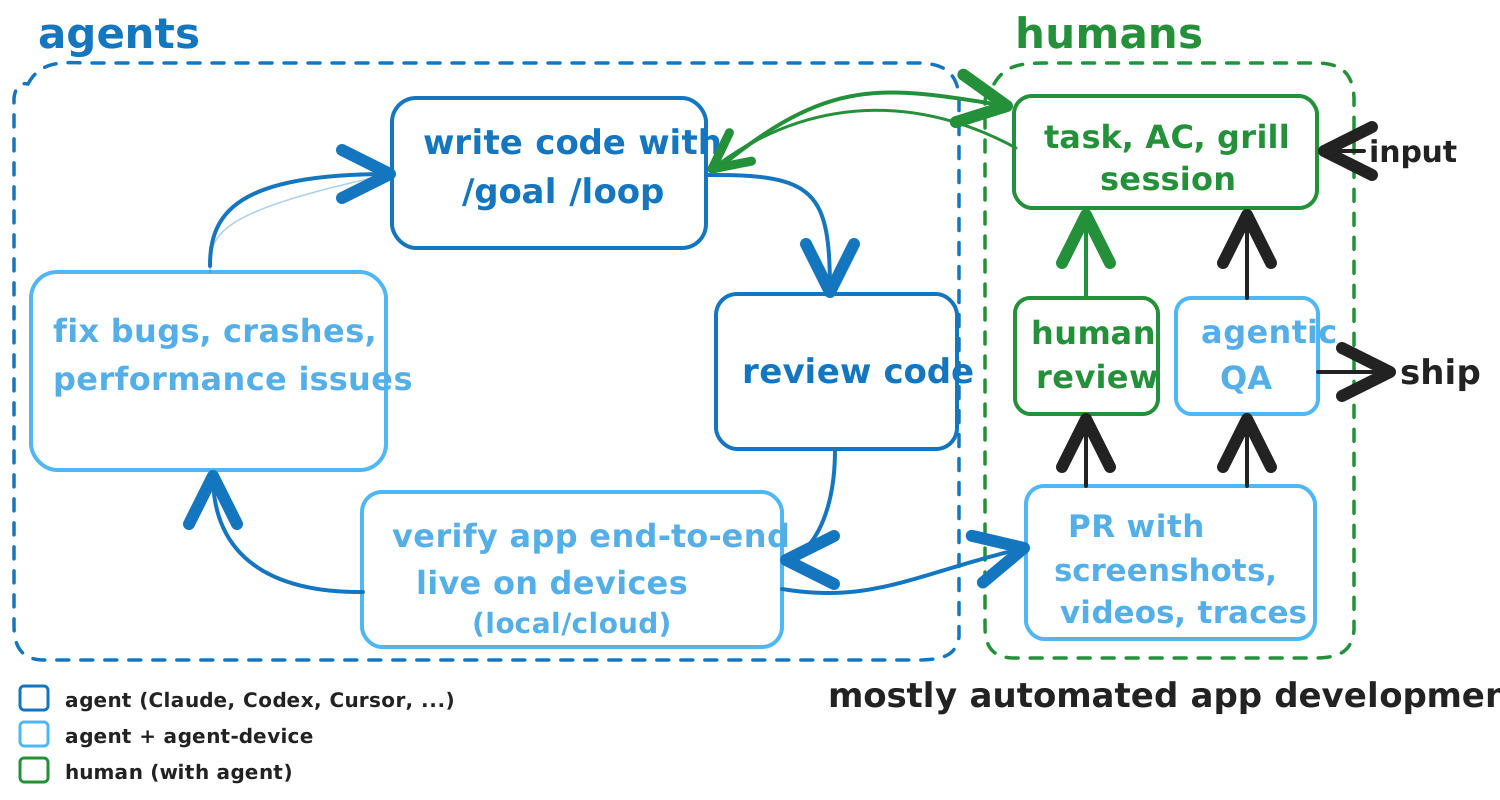
agent-device closes the agentic development loop: agents can write code, run the real app, verify the UI end-to-end, collect screenshots/videos/logs/perf evidence, and feed bugs, crashes, or performance findings back into the next fix iteration before a human reviews the PR.
How agents use it
The normal loop is:
Installed CLI help is the version-matched operating guide. Start there before planning device work:
Use AI Agent Setup for Cursor, Codex, Claude Code, Windsurf, Cline, Goose, skills, and MCP setup. Use Commands for detailed command groups and platform behavior.
Where it fits
agent-device is for agents, but humans still install it, grant permissions, review artifacts, and decide what ships.
It complements scripted test frameworks such as Appium, Maestro, Detox, XCTest, and Espresso. Keep those for stable human-authored coverage. Use agent-device when an agent needs to explore, reproduce, debug, profile, collect evidence, or record a replay from live app behavior.
MCP support exposes direct structured tools for installed agent-device commands. Tools use structured input contracts through AgentDeviceClient, so MCP clients can call device workflows directly while the daemon remains the execution source of truth.
Next steps
- Install the CLI: Installation
- Set up an agent client: AI Agent Setup
- Run the first commands: Quick Start
- Inspect all command groups: Commands
- Collect runtime evidence: Debugging & Profiling
- Record deterministic flows: Replay & E2E